OrcaSlicer 2.5 RC: plugins and a new meaning for Default
Plugins were already in the alpha; the RC fixes filament assignments. What this means for multicolour projects and which limits remain.
Two changes worth separating
A reopened multicolour project can display the same values yet produce different filament assignments. This is a documented consequence of the fix in OrcaSlicer 2.5 RC: if you keep projects and presets, understanding the changed rule matters alongside the new features.
The 2.5 line also expands the slicer’s extensibility with Python plugins. Their announcement already belongs to the alpha: treating them as an exclusive RC debut would conflate two separate steps. This analysis concerns FDM/FFF users and relies on official notes and the technical description of PR #17058, without our own slicing or printing tests.
Plugins: more possibilities, an API that may still change
The alpha notes describe Python extensions for tools, panels and interventions in the slicing pipeline. They also warn that the API may change: having a plugin system does not guarantee that every extension will keep working across versions.
For users considering plugins, the appeal of the 2.5 line is the ability to extend work within the slicer. Documentation alone cannot establish the quality or compatibility of an individual plugin: we have not installed or tested extensions.
Default returns to the object or part filament
In Filament for Features, the RC fixes the meaning of Default: features left at that value use the object’s or part’s own filament. Bridges are the case to remember separately: they follow the internal solid infill filament. This rule concerns these assignments, not every setting called Default in the program.
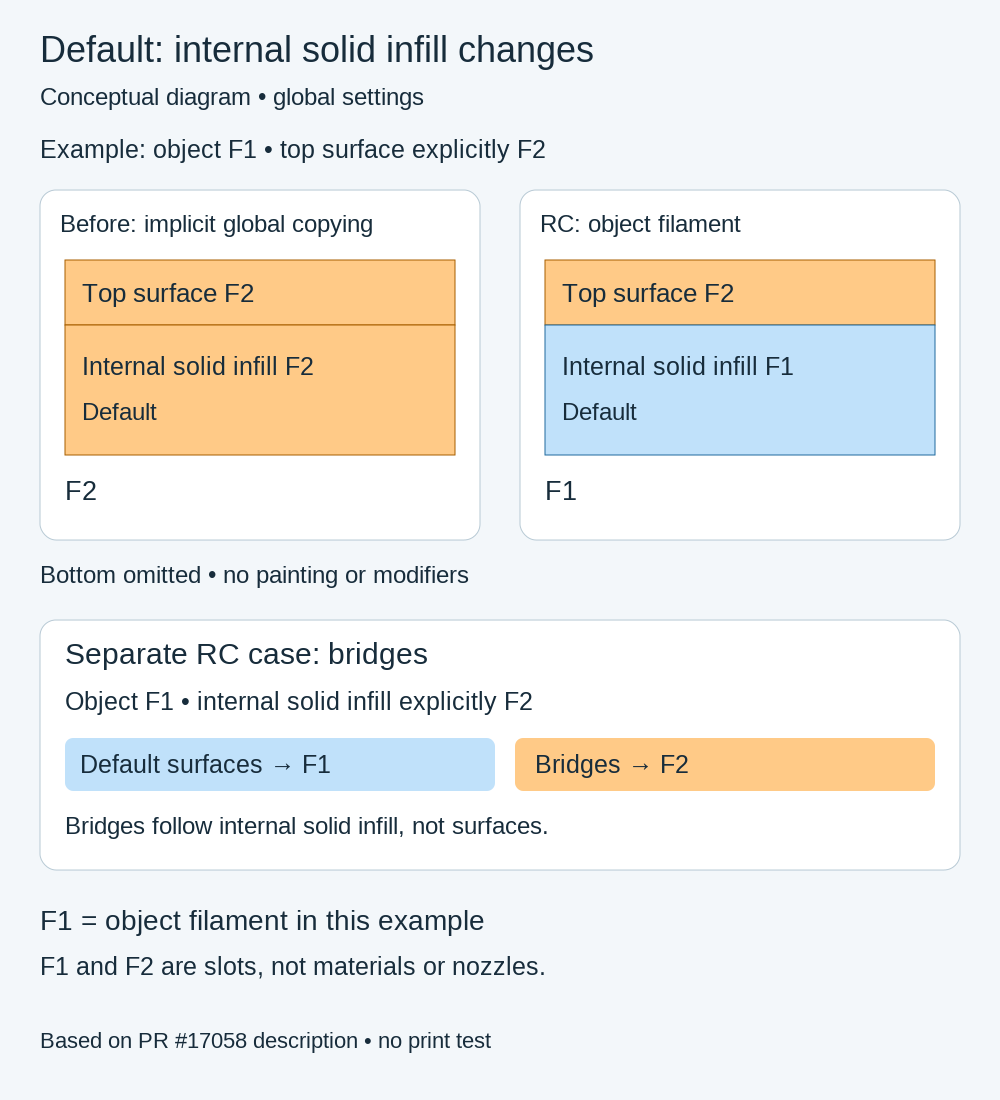
PR #17058 describes the removal of implicit copying between global infill and surface assignments. In the illustration, the object uses F1 and the top surface is explicitly assigned F2. Internal solid infill stays on Default: previously it could receive F2 through global propagation; in the RC it uses F1. The top surface remains F2 in both cases.
The example is restricted to global settings, without painting or modifiers. Local object and part settings were not subject to those global copies; the PR also distinguishes GUI and CLI behaviour. The diagram therefore omits the bottom surface and does not represent every combination in earlier versions.
What this means for saved projects
The issue is not file corruption: some projects and presets that relied on the previous implicit copies may change assignments while retaining the same visible values. Preserving the intended combination may require explicit assignments and a check of the toolpath preview before printing.
This distinction particularly helps users reopening multicolour work. A second case clarifies the boundary: in the RC, with object F1, internal solid infill explicitly F2 and surfaces on Default, surfaces use F1 but bridges follow F2. F1 is the filament chosen for the object in this example, not the universal meaning of Default.
Permissions are not a sandbox
The official wiki describes an interactive audit of plugin operations, including permissions that can be remembered. The same document states that this is not a sandbox: ctypes is not controlled, and work performed by threads created by a plugin loses attribution to that plugin. It does not follow that every sensitive access is always intercepted or requires fresh consent.
Extending the slicer therefore involves assessing the extension and where it comes from. This analysis does not certify plugin security or isolation.
A documented RC, without an upgrade verdict
The v2.5.0-rc tag page is marked Pre-release. That status does not establish that the RC is the latest available version: we analyse that release without prescribing an upgrade or claiming that no later final version exists.
The sources are project documentation accessed on 10 November 2026. Tests reported by the PR author were not repeated; we did not directly review the diff or measure performance or print results. The useful conclusion is limited: distinguish extensibility already announced in the alpha from the assignment fix in the RC, and reconsider work that relied on the previous behaviour.
Sources
- OrcaSlicer 2.5 RC — official release notes — OrcaSlicer, accessed on November 10, 2026
- OrcaSlicer 2.5 Alpha — official release notes — OrcaSlicer, accessed on November 10, 2026
- OrcaSlicer PR #17058 — filament for features — OrcaSlicer, accessed on November 10, 2026
- OrcaSlicer — plugin permission audit — OrcaSlicer, accessed on November 10, 2026